Friday, February 15, 2019

Lovely Layers - CTMH Technique Blog Hop...

Welcome to the LOVELY LAYERS - CTMH TECHNIQUE BLOG HOP! We are happy to have you hopping with us so sit back and be inspired by our Lovely Layers!


There are 15 CTMH Consultants joining us this month and you should have arrived here from Danielle's Blog...just keep on hopping 'till you get back to where you started! If you are starting here, WELCOME!

I have a layout to share with you, using the SO MUCH HAPPY line...I love that's it's BRIGHT and CHEERFUL! This layout has a BUNCH of layers using the So Much Happy PML Cards as well as some of the elements that now come in the Cut-Aparts in every Paper Packet - see that little turn-down in the top right corner...that's a CUT-APART!!! I used to go to great measures to do this and on this layout, all I had to do was cut it apart and adhere to the page...
I also used the So Much Happy Puffy Stickers and Silver Glitter Gems to layer on the embellishments...


Thanks for stopping by! Make sure you hop on over to Terry's Blog and see what LOVELY LAYERS she has to share!

Have a GREAT WEEKEND! Here's a look at some of the products used...stop by my website to pick these up as well as any of our other FABULOUS products!

Wednesday, February 13, 2019

Let's Celebrate GALENTINES....

How many of you have that one (maybe more, if you're lucky) TRUE gal-pals...maybe you guys have been through it all together...maybe you're STILL going through it all together. Whatever the circumstance, we can't let this "day" go unnoticed!

I'm joining 4 other CTMH Consultants in celebrating this day through a Blog Hop dedicated to those gals you LOVE!

If you've come from Becca's Blog, you're on the right track...I'm your last stop if you started at the front...if you didn't, no worries!

Here's a card I made using the Heart Happy special from CTMH...

-----------------------------------------------
I used the Thin Cuts - Stitched Hearts to cut my focal piece...making sure the largest heart cut off the piece of B&T...and that CUTE B&T that peeks out from behind is FULL of gal-friend sentiments!

------------------------------------------------
I also used the Thin Cuts - Stitched Squares to add a pop of darker pink (Raspberry) and those tiny Mint Heart came from the Thin Cuts - Shaker Window & Confetti...LOVE!!!

----------------------------------------------
I finished off the inside with some scraps of B&T...simple yet cute

Thanks for stopping by!

I hope you'll hop on over to Jayma's Blog and see what she has to share...and if you started here, you can keep on hopping all the way around 'till you get back to me!


Tuesday, February 12, 2019

Drawing Shapes in Cricut Design Space...

taken from ctmh's blog...

Drawing Shapes in Cricut Design Space™

Each Close To My Heart Cricut® collection has hundreds of shapes that you can adapt for any project. We’ve shown you some ways you can use Design Space to cut shapes for your scrapbook pages, and today we have another tutorial to expand your creative options with your Cricut®images by changing images from cut to DRAW. This allows you to use the same fonts and shapes to draw a title, journaling, or a background!
image1
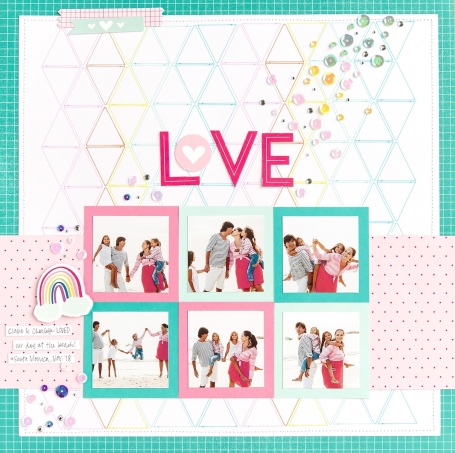
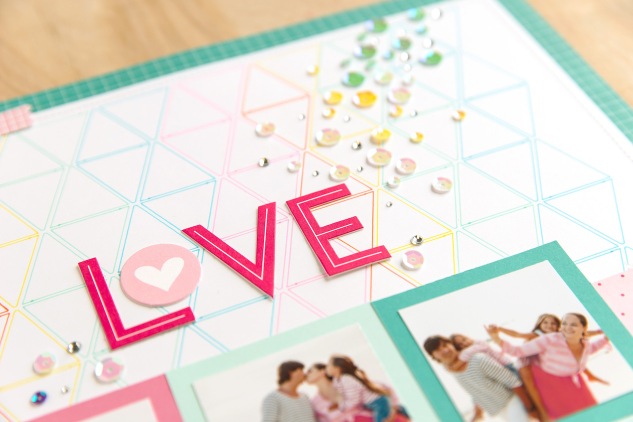
Switching an image from cut to draw in Design Space is very simple. You just click on your shape and change Cut to Draw in the Edit bar above your canvas. Today we are going to walk you through how to make the multicolor triangle background that you see in the page above by using the tools in Design Space to draw, rather than cut, this design.
Keep in mind, to use the same image we did, you must own the You Are Here Cricut® collection. You will also need a Cricut® machine that is Design Space compatible (any of the Explore or the new Maker machines) and allows you to draw with pens. The steps below show you how to work in Design Space from a desktop or laptop computer. If you use the app on a mobile device, the buttons and tools will be located in slightly different places on your screen, but the same features are available on any device.

1. Sign in to Cricut Design Space™ at design.cricut.com.

Log in with your Cricut ID and password, and then select the green New Project button in the top right corner.

2. Insert and resize a basic square shape. Then color the square.

step2
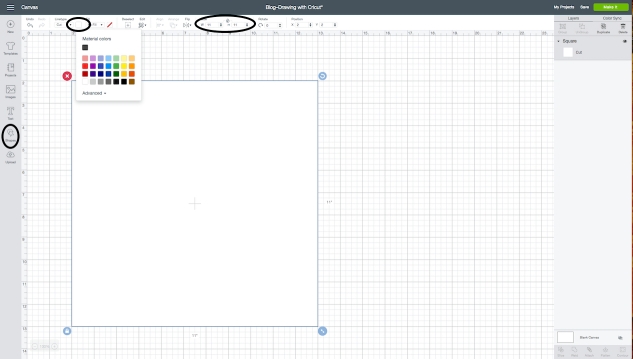
To make the base for the design, you will first insert a square by clicking on Shapes on the left side of your screen. Then add a square to your canvas. You can easily resize this square to 11 by adjusting the width. Make sure to leave the lock icon locked so that the height automatically resizes when you change the width.
In the Edit bar, next to Linetype, select the colored square and change the material color to white. We decided to work with white since we know we’re going to use White Daisy cardstock as the base for the design, and it makes the pattern easier to see as you build it on your canvas.

3. Insert and ungroup the triangle flag. Then delete the extra shape.

step3
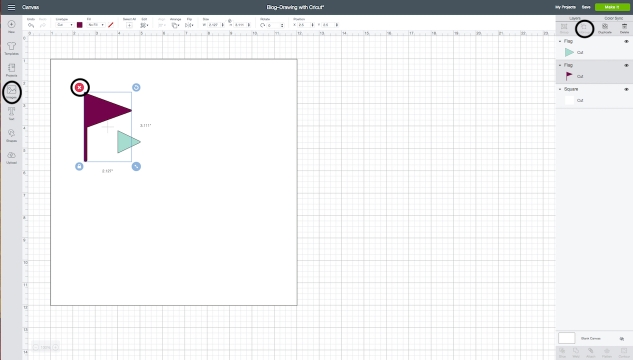
The background uses a triangle flag shape from the You Are Here collection. Click Images to add new image to the canvas. Search for the image using #M282C66F and add it to your canvas. Then click on the flag and select UnGroup in the Layers panel on the right. Once you have separated the shape into two images, you can delete the purple flag. We’re only going to use the triangle shape.

4. Resize, duplicate, and flip the triangle.

step4
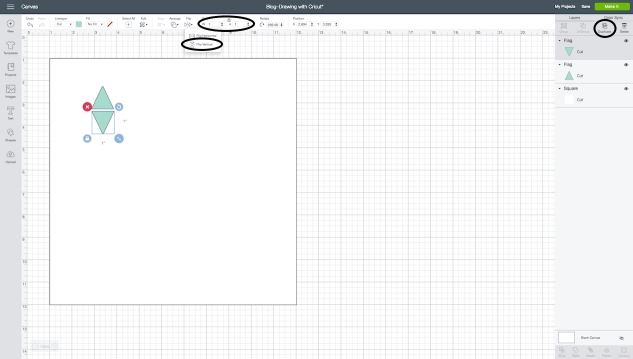
Resize both the width and height of the triangle to 1. Make sure to unlock the image size so that Design Space lets you modify both. Just click on the lock above the measurements. Then select the triangle and then click Duplicate in the Layers panel. To flip the shape, select the second triangle, and under Flip in the Edit bar, select Flip Vertically.

5. Arrange and group both triangles together.

Now that you have two triangles. Line them up vertically, with a small space in between. Then click the first triangle, hold down the shift key on your keyboard, and click the second triangle. Then select Group in the Layers panel.

 6. Duplicate the triangles and arrange in a row, centering horizontally.

step6
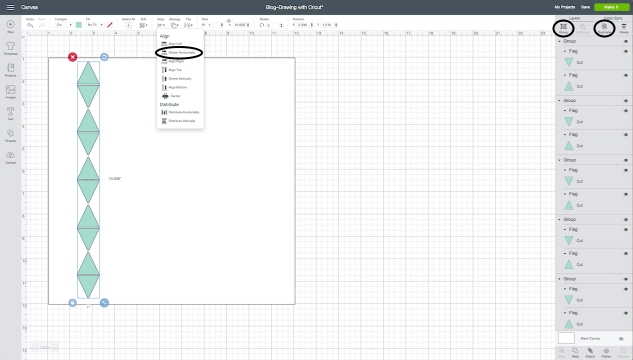
Duplicate the grouped triangles five times and arrange them in a row. You can center these shapes by first selecting all five set of triangles. Just like in step 6, you can do this by holding down the shift key on your keyboard. Then select Center Horizontally under Align in the Edit bar.

7. Duplicate the triangle row eight times.

step7
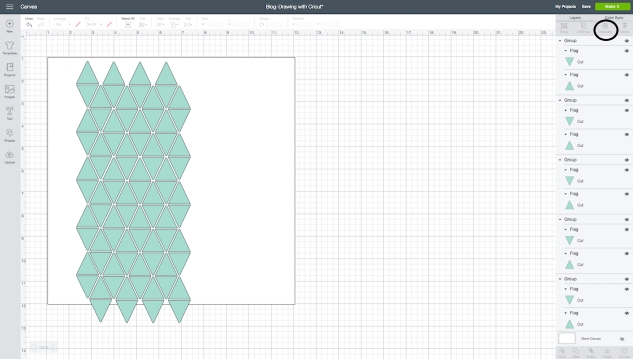
When you have one row of triangles, duplicate the row and arrange as shown above. You’ll need eight rows, with a small amount of space in between each one.

8. Even out the top and bottom rows of triangles.

step8
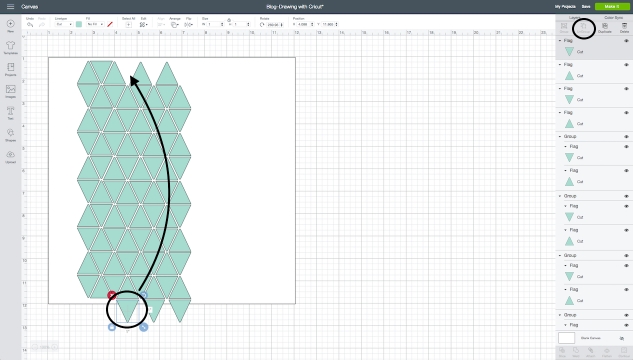
Once you have your rows arranged, you might notice that part of the design isn’t going to fit on the white square. To fix this, you’ll use the UnGroup button in the Layers panel to separate the bottom set of triangles, and move the last triangle from the bottom of the design to the top. This will give you straight edges along the top and bottom, just like you see in the screenshot above.

9. Change cut to draw and add pen color.

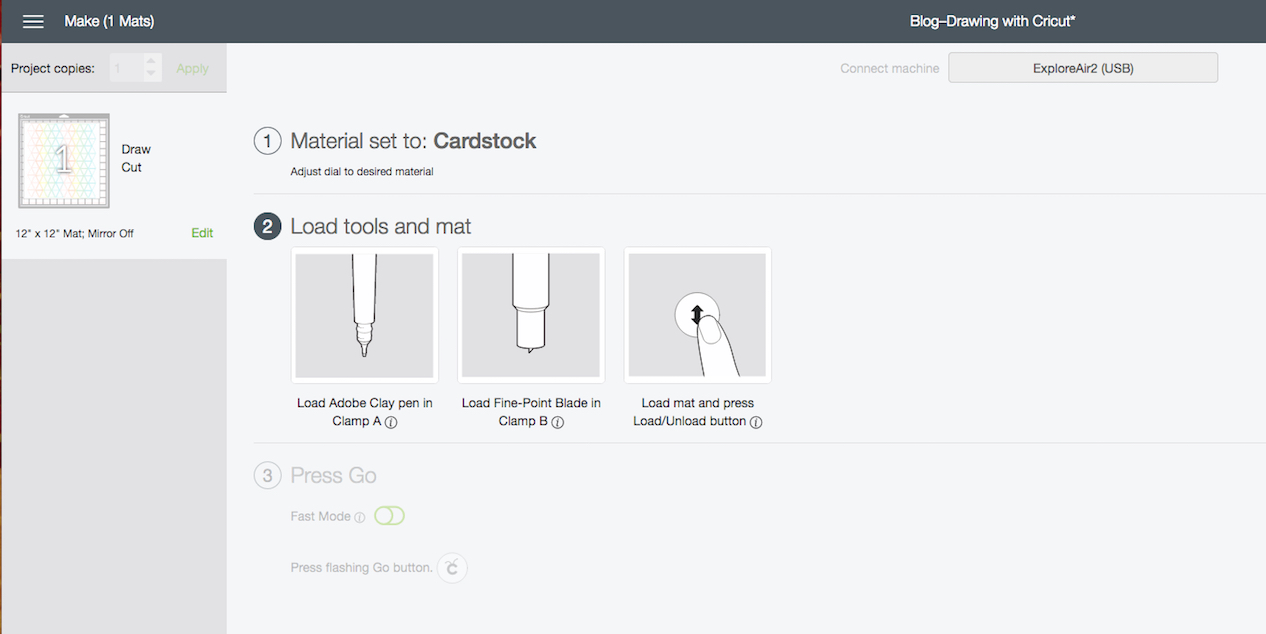
With your first set of triangles ready to go, you can now change the Linetype in the Edit bar from Cut to Draw. Then click on the box next to Draw. This is where you can choose the pen size and color.
We used the Cricut® Sorbet fine point pen set for this project. The pen color for the triangles in the first two rows is Cactus Pink. The third row is Adobe. The fourth row is Yellow. The fifth and sixth rows are Light Green, and the seventh and eighth are Light Turquoise. We’ve found that it’s easiest to use Cricut® pens since they are designed to work especially with their machines.

10. Group nine rows of colored triangles together and duplicate.

step10
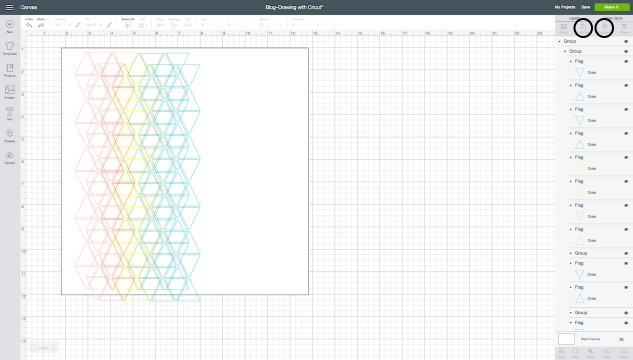
To make the remaining half of the background, all you have to do now is click and drag your cursor over the rows. Then group the rows together and duplicate. Just move this new group of triangles next to the first one, keeping them evenly spaced.

11. Group all rows of colored triangles together. Then align and attach to the white square.

Make sure to group all the triangles together, and then select both the grouped triangles and the white square. Under Align, click Center. This will center the triangles on the square. Then select Attach at the bottom of the Layers panel. This ensures the shapes will draw exactly as you’ve arranged them on the square.

12. Cut AND draw your project!

When you’re ready to draw the design and cut the White Daisy cardstock, click the green Make Itbutton in the top right corner and follow the prompts. You’ll need to load the correct pen color in Clamp A of your machine. Design Space will tell you which pen to use first, and then as your machine draws the design, it will prompt you to switch to the next color. When you’re done, you’ll have a bright multicolor background for your page.
image2
Changing your Close To My Heart shapes from cut to draw will give your scrapbook pages a different look and feel then using cut shapes. You could even use this concept to draw a background or write a personalized sentiment on a card. Take some time to try this out with your favorite Close To My Heart Cricut® collections. The possibilities are endless!

Tuesday, February 5, 2019

Join my CTMH Team - here are 35 reasons why...

TAKEN FROM CTMH'S BLOG...

35 Reasons to Sign Me Up!

This year, Close To My Heart is celebrating 35 years in the world of scrapbooking, cardmaking, and papercrafting. That’s 35 years of creating innovative products to help you celebrate those you love and preserve your cherished memories. It also means we’ve spent decades helping others become leaders and achieve their goals as Close To My Heart Consultants. In the spirit of this celebration, we have 35 amazing reasons why you’ll want to sign up this month as a Close To My Heart Consultant, including free stamp sets!
Sign Me Up! #ctmh #closetomyheart #ctmhsignmeup #illustratedalphabet #alphabetstampset #scrapbooking #cardmaking #papercrafting
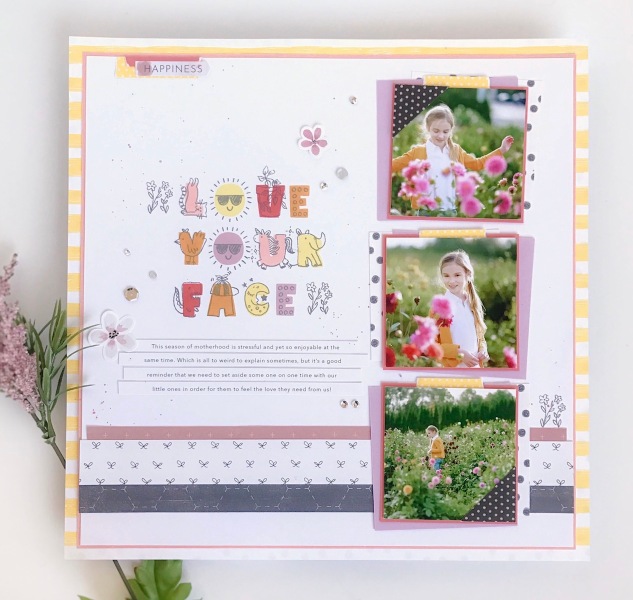
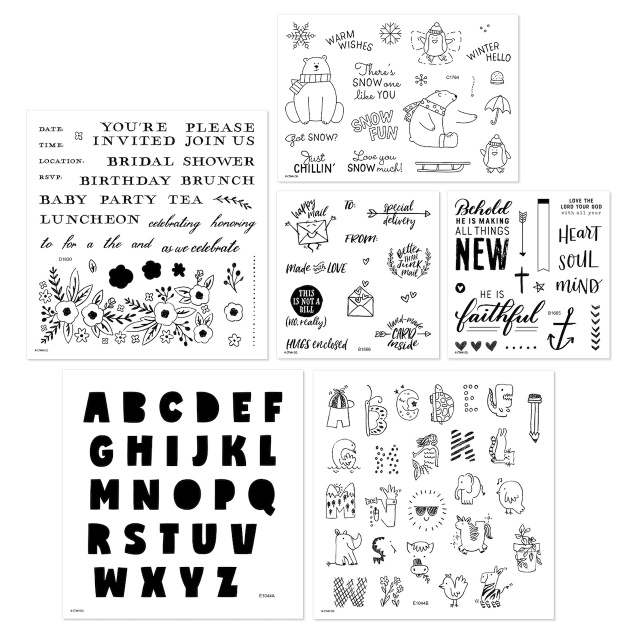
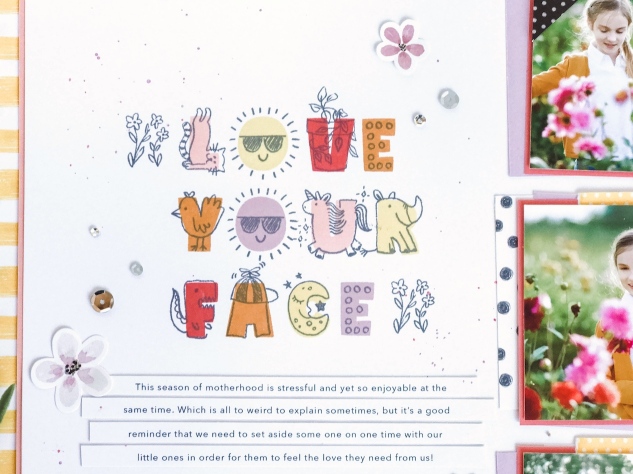
Just during February, when you sign up as a Close To My Heart Consultant, you’ll get a special bonus—all five exclusive Hostess Rewards stamp sets from the Seasonal Expressions 1 idea book. That includes the Illustrated Alphabet stamp set that we used for this happy title on the scrapbook page above.
Are you ready for 35 reasons why you’ll want to be a Close To My Heart Consultant??
Here they are:
  1. Get a discount on your favorite memory keeping and papercrafting products
  2. Earn amazing rewards like trips to other parts of the world (think Tahiti, Argentina, or the Caribbean!)
  3. Have access to new products before anyone else
  4. Make money by sharing your creativity with others
  5. Use how-to books for scrapbooking and cardmaking that are especially designed to make it easy to show others that anyone can be creative!
  6. Structure your business to work around the priorities in your life
  7. Build lasting friendships
  8. Take advantage of a New Consultant Kit with essential business supplies to help you get started
  9. Work from anywhere
  10. Receive Close To My Heart Cash when you sign up to spend on products like paper packets, cardstock, stamp sets, or stamp pads of your choice
  11. Get creative inspiration from other Consultants
  12. Start a business with no experience required
  13. Meet other people with similar interests
  14. Earn additional rewards like exclusive stamp sets, a logo t-shirt, and bonus products when you meet particular sales goals in your first 90 days as a Consultant
  15. Be your own party Hostess as a Consultant—this means you can take advantage of the Consultant discount AND the Hostess Reward program at the same time
  16. Use training and marketing resources available online from Close To My Heart to help your business succeed
  17. Make crafting your part-time to full-time living—it’s up to you!
  18. Receive weekly emails from Close To My Heart to walk you through the steps you should take to get your business started
  19. Be your own boss
  20. Use your Consultant discount on a Craft with Heart™ subscription
  21. Get a free e-commerce website to make shopping with you easy for your customers
  22. Participate in the Close To My Heart community online and on social media where you’ll find resources and encouragement from others just like you
  23. Attend regional or national events for business training, product training, creative sessions, and more
  24. Get started with a low-cost New Consultant Kit (plus bonus stamp sets this month!)
  25. Introduce others to the joy to recording and sharing their unique story with Story by Stacy™ workshop kits
  26. Set your own schedule
  27. Make money doing what you love!
  28. Receive recognition from Close To My Heart when you reach business and sales benchmarks
  29. Bring people together to do things that you enjoy like scrapbooking, cardmaking, and papercrafting
  30. Learn valuable business skills from Close To My Heart staff, online resources, and fellow Consultants
  31. Participate with Close To My Heart to contribute to our charitable partner, Operation Smile™, helping children get life-changing facial surgeries around the world
  32. Learn how to celebrate the relationships in your life and teach others to do the same
  33. Flexibility to adapt your business to your goals, whether you’re looking for a discount on products you love or plan to build your business to earn an income
  34. Connect with other people that encourage you to reach your goals
  35. Receive five free stamp sets when you sign up in February!
These are all phenomenal reasons to join the Close To My Heart family. Plus, the free stamp sets you get when you sign up this month make becoming a Consultant an even better deal.
Sign Me Up! #ctmh #closetomyheart #ctmhsignmeup #illustratedalphabet #alphabetstampset #gotsnow #thisisnotabill #letscelebrate #scrapbooking #cardmaking #papercrafting
These stamp sets will help you add a little extra something to any project, including cards, envelopes, scrapbook pages, and more. We love how you can combine the solid letters and illustrated overlay images with the Illustrated Alphabet. Take a closer look at that title.
Sign Me Up! #ctmh #closetomyheart #ctmhsignmeup #illustratedalphabet #alphabetstampset #scrapbooking #cardmaking #papercrafting
February is the perfect time to take advantage of this special and all of the opportunities available to you as a Close To My Heart Consultant. To get started, click here, and you’ll be on your way!

Monday, February 4, 2019

Recipe for Love with H2H...

Happy LOVE MONTH...I plan on seeing pink and red and HEARTS all month long 😍

Let's start it off with a new H2H Challenge - FAVORITE RECIPE.

AND I'm gonna stretch this challenge by telling you guys that my FAVORITE RECIPE for love and happiness is this sentiment right here!

It comes from February's SOTM - Heartfelt Sentiments and everything else comes from the Heart Happy Kit!


--------------------------------------------
I used the Thin Cuts - Stitched Hearts to cut the heart out of the center of my card-front. The B&T peeking from behind the heart is PERFECT to add the splash of Raspberry/Candy Apple I was looking for. I thin took my Mint Shimmer Brush and used it to splatter shimmery goodness here and there to break up all the white space! Lastly I used the heart confetti to add some HEARTS...


I was totally inspired by Hearts Hugs and Flowers...as well as all the HEART HAPPY products from CTMH 💗

I hope you'll play along with us in February...starting with this challenge!